Payments & Fees · SMP-Elite
School fee collection system for counters, receipts and online payments
SMP-Elite is a school fee collection system for private, tahfiz, kindergarten and religious schools in Malaysia. Clerks collect fees at the counter and issue official receipts with the school's own numbering, parents can pay online by FPX or card, and administrators see arrears and reports for each school bank account in one place.
30-day trial with every Full plan module (e-Invoice excluded) · no credit card · no contract
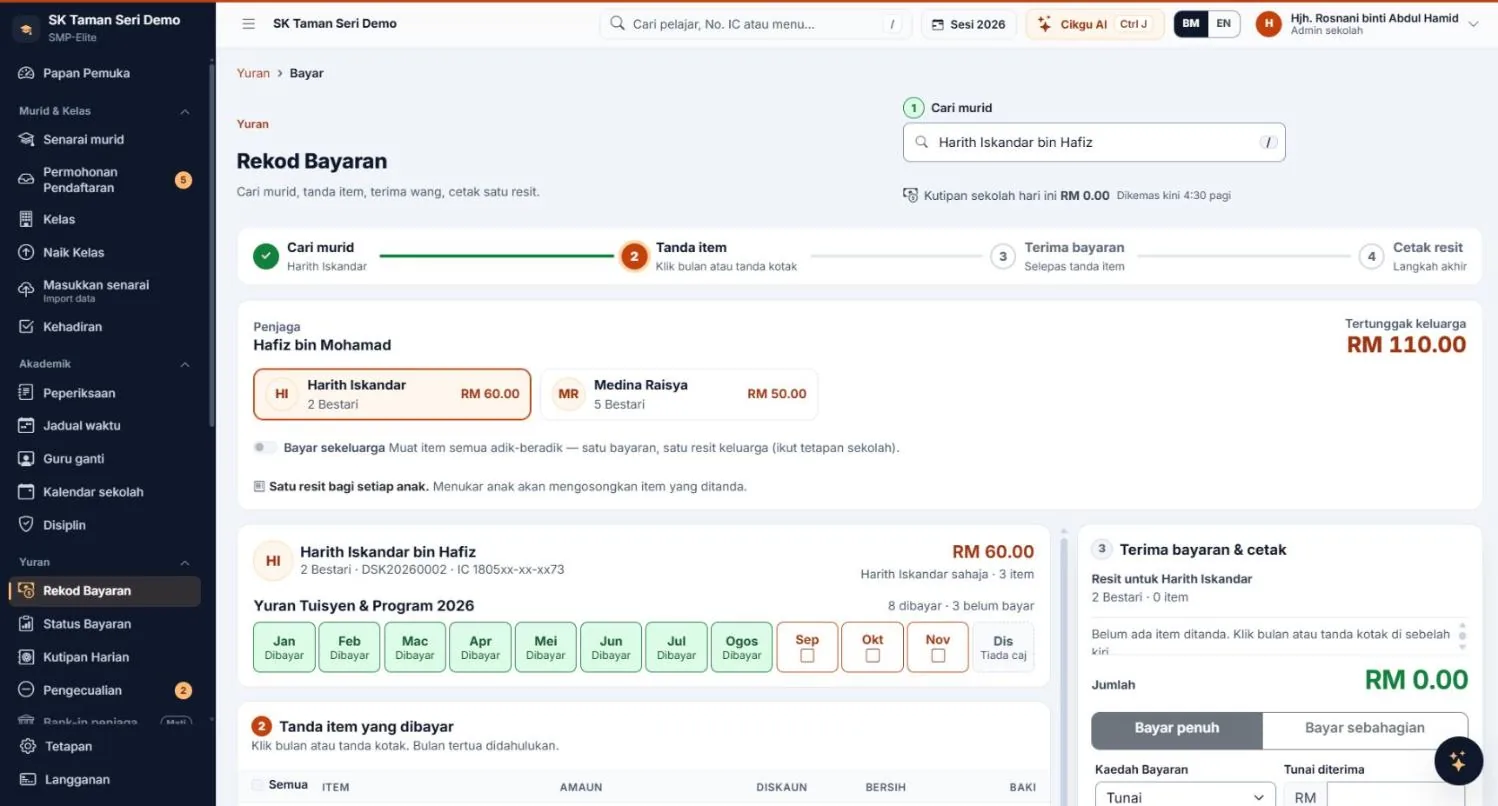
Counter & official receipts
How do counter fee collection and official receipts work?
The clerk finds the pupil, ticks the fees being paid and prints the receipt. Number format and receipt books follow your school's own practice.
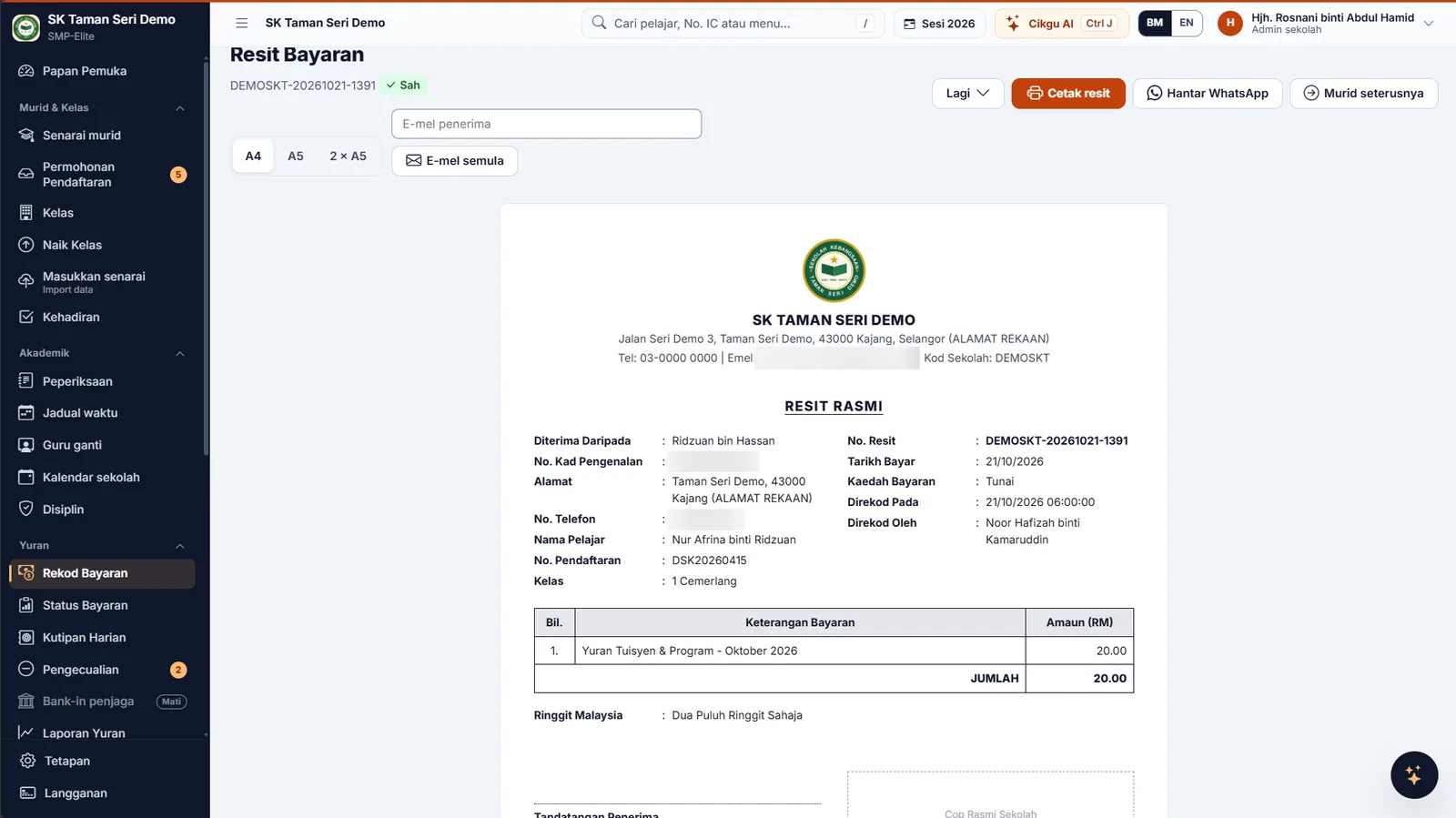
The PIBG (PTA) account is kept separate from the school account.
Choose a bank account for each fee: PIBG fees go to the PIBG account, other fees to the school's finance account. Daily collections, printouts, online payments and reports are split by account.
Changing a fee's account requires the administrator's password, and every change is logged.
- Official receipts with your own numberingNumber format and receipt books follow your school's practice. Receipts can't be deleted — only cancelled with a reason.
- One family receiptSiblings paid in one go, with each child's name on every receipt line.
- Part payments at the counterAllocated to the oldest fees first; the receipt shows the balance remaining.
- Daily Collections that balanceBlind counts and cash-difference checks, split by the school's bank accounts.
- Exemptions for asnaf & orphansApproved by the administrator. The category is never shown to teachers, parents or on receipts.
- Arrears chase listPolite WhatsApp messages ready to send, privacy mode, and automatic reminders you can schedule.
- Receipts three waysPrint them, or send them by WhatsApp or e-mail.
- Audit log & reportsEvery setting change, cancellation and online payment is logged. Reports can be printed and exported to CSV.
Online payment & arrears
How do parents pay school fees online?
Parents pay online, money goes straight to the school's account.
FPX and cards through ToyyibPay; FPX, cards, DuitNow QR and e-wallets through CHIP — using the school's own merchant account, not through MJ Solutions. Online payments are recorded and receipts issued automatically.



How do you chase overdue fees politely?
The administrator uses the chase list: polite WhatsApp messages are already written, privacy mode, and automatic reminders can be set up the way the school wants. Asnaf and orphan exemptions are approved by the administrator, and the category is never shown to teachers or parents.
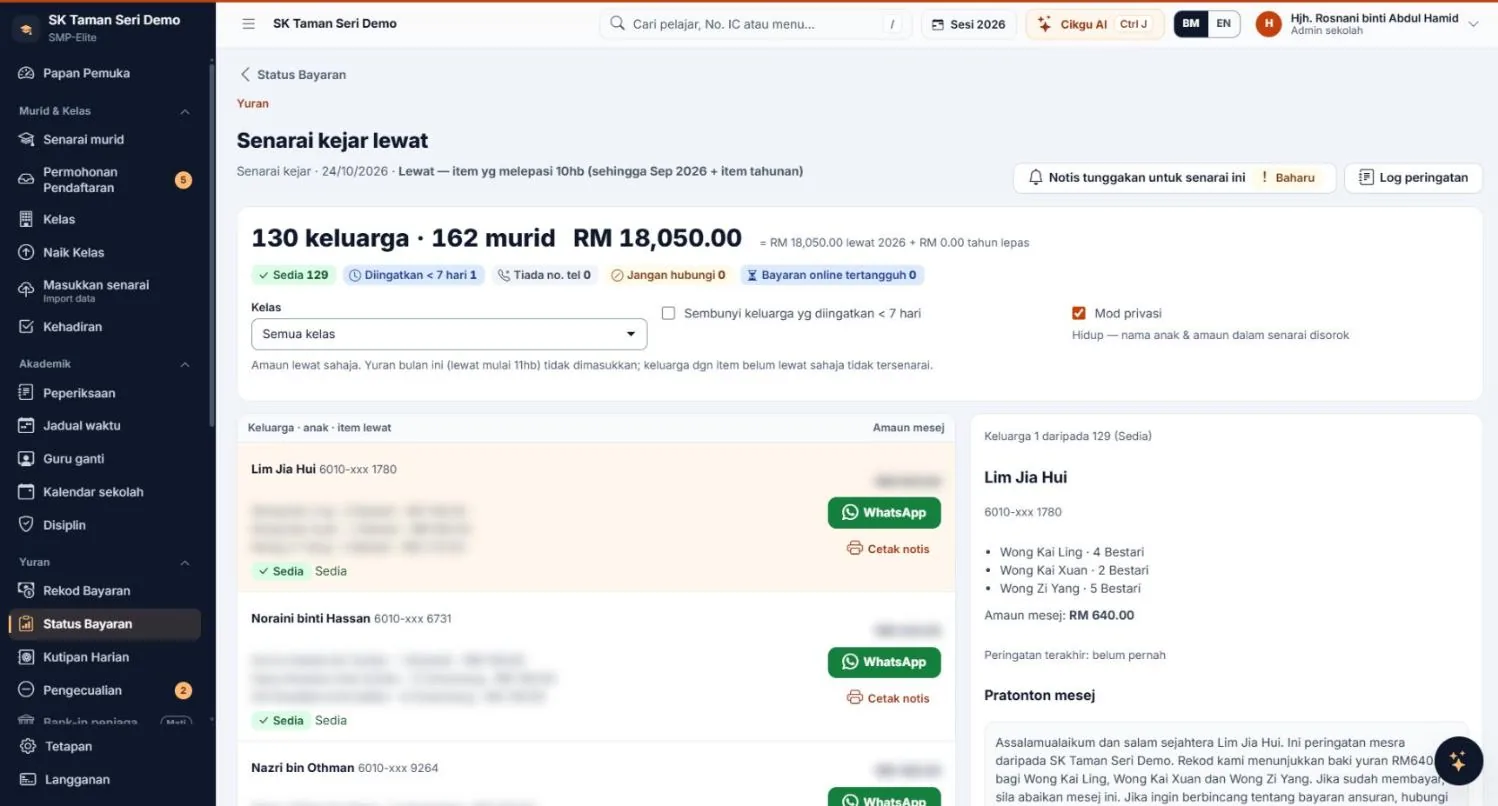
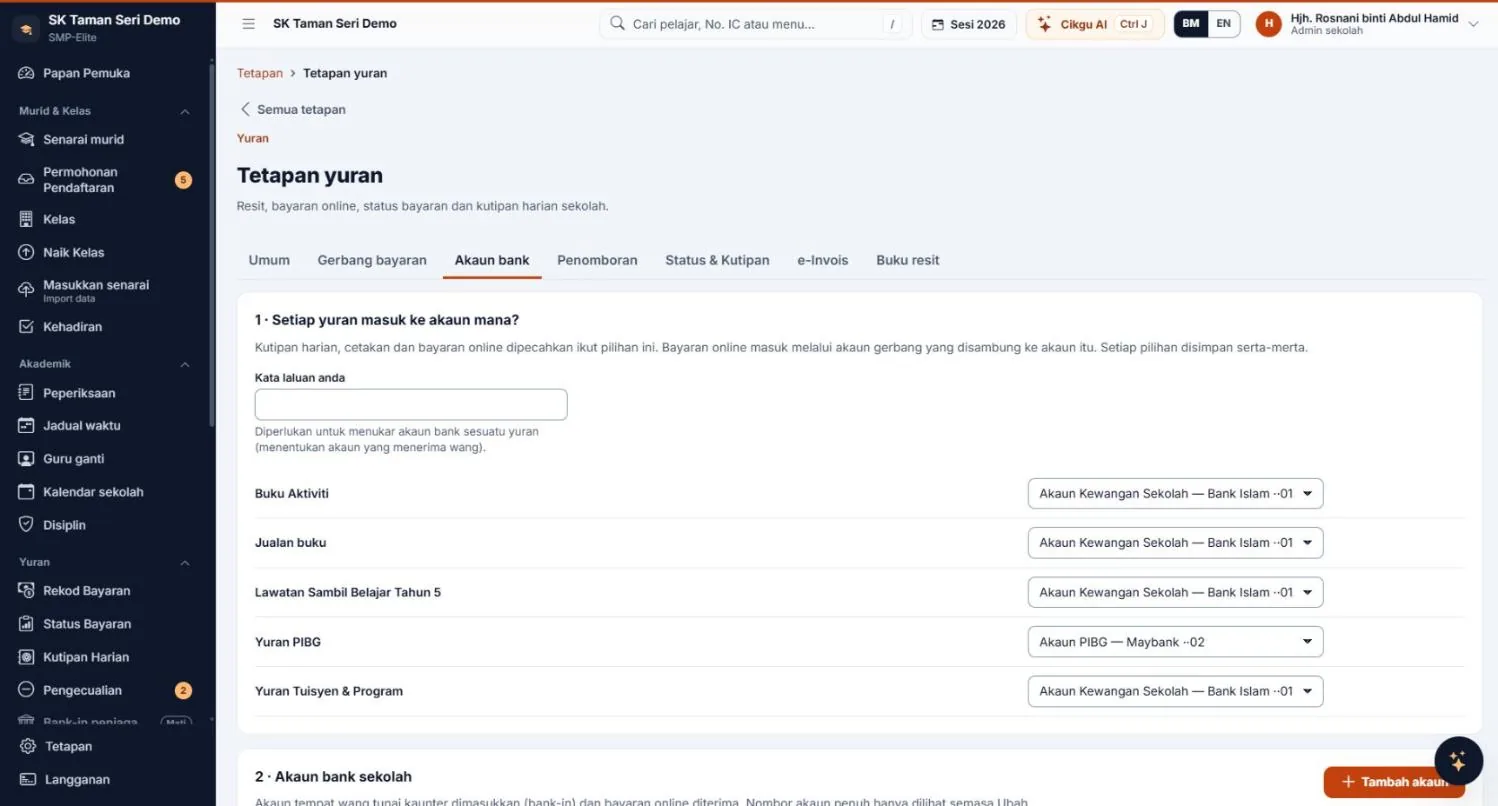
Online payment methods and transaction fees depend on the gateway and the school's agreement with the provider. Parents pay online in full; part payments are taken at the counter. All screenshots show sample data (simulated).
Excel vs a system
Paper books and Excel, or a dedicated fee system: what is the difference?
| Topic | Paper books / Excel | SMP-Elite |
|---|---|---|
| Receipts | Handwritten or typed; numbering checked by hand | Official receipts with your own numbering; can't be deleted, only cancelled with a reason |
| Siblings | One receipt per child, or worked out by hand | One family receipt with each child's name on every line |
| Part payments | Balance calculated and noted manually | Allocated to the oldest fee first; balance shown on the receipt |
| PIBG and school accounts | Kept apart in separate sheets or books | Bank account chosen per fee; reports split by account |
| Daily collection | Counted and checked yourself | Blind count and cash-difference check by account |
| Arrears | Lists filtered and messages typed one by one | Chase list, ready-written WhatsApp, privacy mode, automatic reminders |
| Parents paying online | Bank transfers checked and recorded by hand | FPX, card, DuitNow QR or e-wallet; recorded, with receipts issued automatically |
| Change history | Hard to tell who changed what | Audit log of every setting change, cancellation and online payment |
| Reports | Built by hand each time | Printable and exportable to CSV |
Moving off Excel? Read how to manage school fees without Excel (in Bahasa Melayu), or see all SMP-Elite modules.
Pricing
How much does the SMP-Elite school fee system cost?
The Payments & Fees module is included in the Basic (Asas) and Full (Penuh) plans. The Core (Teras) plan does not include it.
Teras
RM79 a month6 core modules + Cikgu AI. Payments & Fees not included.
Asas
RM199 a monthAdds Payments & Fees, Attendance, Exams and Messages.
Penuh
RM299 a monthEvery module except LHDN e-Invoice.
Pay yearly and you pay for 10 months. The price is the same for schools under 1,000 active pupils; at 1,000 active pupils or more, prices are × 1.5. The 30-day trial includes every Full plan module (e-Invoice excluded), with no credit card and no contract. The LHDN e-Invoice module is an add-on at RM40 a month. Your data can be exported to Excel.
Built by the team behind SKY Online — a school fee collection system since 2007.
School fee system FAQ
Tap a question to see the answer.
How much does the SMP-Elite school fee system cost?
Payments & Fees is included in the Basic plan at RM199 a month and the Full plan at RM299 a month. The Core plan at RM79 does not include fees. Pay yearly and you pay for 10 months. Schools with 1,000 or more active pupils: prices × 1.5.
Can a fee receipt be deleted?
No. Official receipts can't be deleted, only cancelled with a reason, and every cancellation is recorded in the audit log. Receipt numbers follow the format and receipt books your school sets up.
Whose account do online payments go to?
The school's own merchant account, not through MJ Solutions. Transaction charges depend on the school's agreement with the payment gateway. Online payments are recorded and receipts are issued automatically.
Can the PIBG account be kept separate from the school account?
Yes. Choose a bank account for each fee, for example PIBG fees to the PIBG account. Changing a fee's account needs the administrator's password and is logged. Daily collections and reports are split by account.
What if a parent pays only part of a fee?
Part payments at the counter are allocated to the oldest fees first, and the receipt shows the balance remaining. Parents pay online in full.
Can we try it before subscribing?
Yes. The 30-day trial includes every Full plan module except e-Invoice, with no credit card and no contract. You can export your data to Excel at any time.
A more organised fee collection starts today.
Sign up in minutes. 30-day trial, no credit card needed.